Showing posts with label Google. Show all posts

Tuesday, April 29, 2014

Now for Something Different - Android on my Laptop

HP Slatebook 14 will come with Android
To be perfectly honest, I take little interest in tablets and smart phones and their operating systems.  If one day I own one, that might change.  I had heard of Google's Android phones and tablets, but last week when I randomly came across an old article explaining that Android is available to be installed on laptops, I couldn't help but to be curious.

I did some investigation to find out that laptops are currently being put on the market with Android.  So, I headed over to the site for the Android X-86 project, downloaded the ISO and I was off to the races.

Background - My Experience with Tablet Operating Systems

When my wife bought a new laptop with Windows 8 on a year and a half ago, I realized very quickly that I was not a fan of the new app-based start screen.  To me it looks clumsy, disorganized and in general very visually unappealing.  This surprised me from Microsoft.  (This was also one of the final steps to push me towards Linux, but that's a different story.)

Windows 8 - Bulky and visually unappealing
I also guessed that part of what Microsoft was doing was making an operating system suitable for/based on the smart-phone/tablet OS concept.  To begin with, this gave me a dislike for the idea in general.

Later, however, I tried some netbook-oriented desktop layouts, which basically work on the same visual concepts, without the focus on web-apps.  For example, Kubuntu's netbook remix has a very similar layout concept to that of Android.  In fact, while I'm not a fan of Kubuntu/KDE's visuals in general, I did like the netbook remix because of this; I probably would've gone with that, except that it was noticeably slower on a netbook than Xubuntu/XFCE.

Also, even though I focused on learning the command-line in Linux, Ubuntu's Software Center get me used to the idea of a web-store for apps.  By the time I dove into Google Play on my newly installed Android OS, it no However longer seemed foreign and awkward.

A laptop with Android
Advantages of Android on a Netbook

Although I have not dived very deep into Android and I have not customized the desktop as much as I would like, I have found some real advantages, including these:

  1. It's Very Lightweight and Fast - Android was designed for smartphones and tablets which are not high-powered machines.  Therefore, it works extremely well on the light-weight netbooks like my Acer Aspire One.  Anyone who has installed a Linux distro will notice that the ISO downloads and sets up in Unetbootin really quickly.  Installation is also the fastest I've tried (except for Puppy Linux, perhaps.)
  2. It's Visually Ideal - Smartphones and tablets have small screens, and Android's layout was set up accordingly with large icons and quickly accessible full-screen navigation instead of traditional menus.  It's also a very nice looking desktop.
  3. There are Many Apps Available - Google has ensured that Android is well-provided for in Google Play, not only with ultra-light smartphone apps, but also with a number of fully functional programs like Chrome. (I was actually surprised to see that Chrome was not the default.)
  4. It's Linux - Most Android users don't know that it's Linux.  That having been said, the experience, as I see it, is un-Linux-like; for example, you can't just go into a terminal window and use the commands that seem to work in just about every other Linux distro.
Some Disadvantages/Problems

First of all, I assume that the new laptops that come with Android installed have fixed any problems to make it run ideally on a laptop.  But installing it as I did, I've found the following issues:

  1. Screenshot doesn't work - The ones on this post are borrowed from other sites.
  2. Mouse function is touchscreen-style - Instead of being able to click and drag to highlight text in a web browser, for example, you have to click and hold until it hightlights a section, at which point you can use the cursor or arrows to change what's selected.  Scrolling in any app is dragging the screen rather than clicking on an arrow/scrollbar or using arrows.  This isn't really a "problem" but it takes getting used to.  It would be perfect for a laptop with touchscreen.
  3. Some apps won't run in the background - For example, three Grooveshark music player apps I found (not to mention the website) stops working as soon as you navigate to a different app or even the desktop.  I think you can find apps that especially indicate that they keep running, but this point is a nuisance since some apps (like music apps) are useless if they don't run in the background.
  4. The screen saver flickers on and off.
  5. Dual booting is tricky to set up - If you've dual booted before, the process is quite different.  For someone just trying to rescue an old netbook for easy web access this wouldn't be a problem.  For anyone else, these instructions from Webupd8 work perfectly.
The Android X86 installation screen
There may be solutions to these issues.  As for installing and having a fully functional desktop without having to fix and adjust first (a point in which most Linux distros I've used excel) there needs to be some improvement.  However, it is a very lightweight, fast and visually appealing operating system.  While I probably wouldn't use it for myself, once some of the glitches are worked out, I would consider installing it on a netbook for someone else - especially someone who's already used to using a smartphone.  It's definitely a huge improvement on the monstrosity called Windows 8 which instead of becoming slimmer and sleeker seems to me to be bulky and awkward - both visually and in usage.  Android is sleek and well-designed in both aspects.

In the mean time, I'm definitely going to keep fiddling around with it to see what's possible.

Sunday, May 12, 2013

In Xubuntu, Firefox Works Perfectly (and Thunderbird)

The Firefox-Ubuntu Logos combined
So, here it is: my apology to Mozilla, the developer of Firefox.

My (Unmerited) Quarrel with Firefox
Almost a month ago, I changed to Chrome and posted an embittered complaint against Firefox on this blog.

Then, about 2 weeks ago, encountering the same problems of a bogged down computer, I came to the conclusion that the main the problem was that my mini was not meant for an operating system like Windows 7 (which I suspected from the very beginning).

And Then ... Xubuntu
I proceeded to removed Windows 7 in favour of Xubuntu (a lightweight version of Ubuntu) which has been working flawlessly on my 1 GB mini.

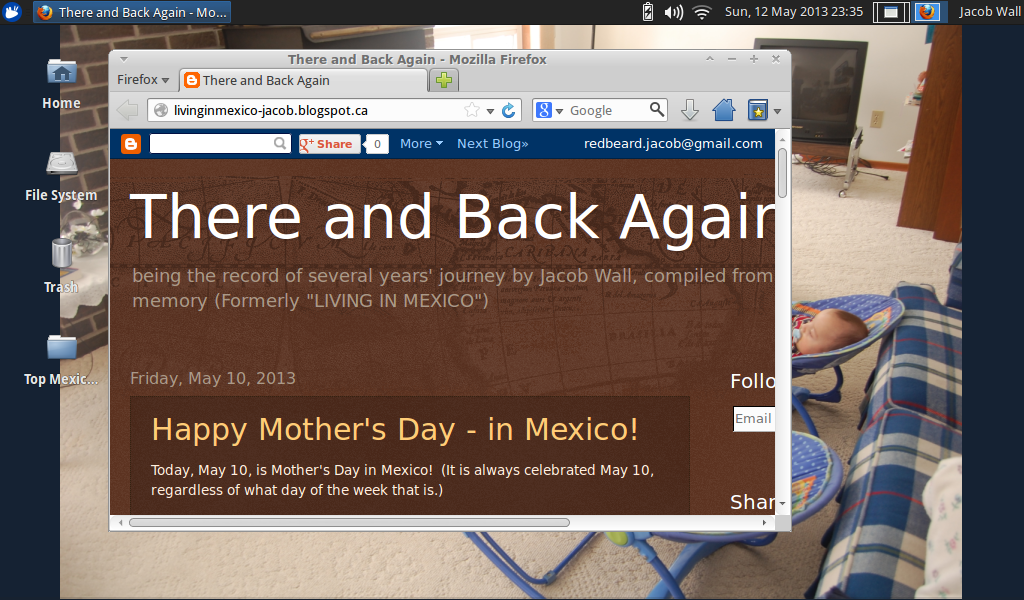
My personalized setup of Firefox in Xubuntu
With Xubuntu came Firefox and Thunderbird, Mozilla's e-mail program which I had used with near-religious dedication previous to my short-lived conversion to Chrome. (After ditching Firefox, I also replaced Thunderbird for the offline apps for Gmail and G-Calendar on Chrome.)

I figured I would give them a second chance; after all, if they worked well, it would only confirm that Windows 7 was indeed the main problem.

Result: They have worked amazingly well! No slowdowns, no delays, no bogging down, no crashes, etc.

Thunderbird with more features, working better!

The Ubuntu-Google Search default start page
Additionally, I set up:
  • Lightning (Thunderbird's calendar) which I had also used before
  • Synchronization with Google Calendar (which I had set up during my abandonment of Mozilla)
  • Synchronization of my Google address book with that of Thunderbird (this process is not flawless, but it is consistent, so I can easily work around the glitches)
  • Synchronization of Gmail, so I can read and send mail from that account in Thunderbird, which automatically synchronizes with Gmail

All the synchronization is instant and 2-way.

Thunderbird E-mail program in Xubuntu
Besides the fact that these services make my life easier by bringing my Google account to my desktop and usable offline, they should make Thunderbird heavier and slower starting up than before.

However, to the contrary, running in Xubuntu, it loads within a few seconds and never slows down, freezes or crashes as it did daily running in Windows 7.  Firefox loads in about 1 second.

Don't Drink (Windows 7) and Drive (a mini)
Again, for the record, I have nothing against Windows 7 per se.  However, it was simply not made to work on a mini laptop with only 1 GB of memory (or "netbook" I believe they're called more officially.)

But there are good, free operating system alternatives out there.  Xubuntu is one of them.  It is easier to change systems than endless try to tweak W7 and try lighter programs to make it work on a system that simply can't handle it.

Lightning Calendar in Thunderbird for Xubuntu
Firefox is Back
So, needless to say, Firefox is back for me, probably to stay, along with Thunderbird.  I flirted with the idea of trying Chrome.  I tried Chromium (the same thing) for about an hour, but saw no real advantage.  Both work well.  Chrome is fine, and I see no problem with it.  If I ever have problems with Firefox in the future, I will not hesitate to go back.

But Firefox, the browser I know and like best, turned out NOT to be the problem and actually works really well in my new operating system.

I am now happily in the Mozilla camp once again.

In other news, yesterday I installed Xubuntu on another mini that I had left abandoned as "fried" for two years. It too works flawlessly.  But that will be another post.

Thursday, April 18, 2013

And Now for Chrome ...

In the Beginning...
For a brief time in my teenaged years I used Netscape. At some point, I changed to Mozilla/Firefox and I never looked back.  I was a solid convert.

Internet Explorer never cut it for me, and it still doesn't.  Like so many things Microsoft comes out with, their user-friendliness makes no sense to me and I fumble over it all the time.

When Chrome was released I tried it briefly.  I could never find what I wanted to do (bookmarks, history, settings, etc.) and I had actually been quite happy with Firefox, so I just uninstalled it.  I had only tried it on the excitement of a new thing from Google, and the recommendation of a friend.  Later again, the same friend reassured me it had improved even more.  But basically, my contentedness with Firefox left me with no desire or need to try anything else.

Disillusionment


But that has changed.  A few months ago, my laptop (an under-performing mini from Acer that really isn't fit for Windows 7) started getting bogged down to the point where I couldn't even shut it down properly.  I found some online fixes, including registry and graphics adjustments.  They helped a lot, but not completely. Although it had stopped freezing up, it still slowed down to the point where I would have to waste half an hour closing everything and shutting down (that's how slow it was) and restarting to make it work properly.

And then came the shocking realization.

Could it be that some service or function of my dear Firefox was causing the problem?  I had realized that the slowdowns only happened when Firefox was running.  In fact that had always been the case, but for months I just assumed that it was the internet activity, and not Firefox itself.  But even after the registry and graphics fixes, the pattern just became that much more clear.

Just today, it struck me; for the second time in a week, Firefox was running like a tricycle on mud road, taking a good 20 minutes to open pages.  In good faith, I assumed that we were having internet problems.  (Even this morning, I still readily and undoubtingly blamed Bell Canada without even considering Firefox.) Then my wife sent me a message over Skype. She was upstairs in the same house on the same internet connection.  No problems. (With crawling twin babies, and two other young children, it's easier than trying to come downstairs in person.)  I opened Internet Explorer to finish something off before restarting.  No problem.  Could it really be?

The Big Move
Quickly coming to the (shocking, life-changing, devastating yet fully liberating) realization that it was becoming increasingly apparent that Firefox was probably the main culprit all along, and still disliking Internet Explorer, I quickly downloaded and installed Chrome, hoping to retrieve some work that had been unsaved when Firefox starting "spinning its tires."  No luck.  Firefox had cost me an hour of work this morning. (Yes, I know, you're supposed to save every few minutes but in this case it was clearly the case of Firefox.)  And how many hours of frustration and searching the internet for improvements to make Windows 7 faster had Firefox already caused me?

I did a few blog posts on Chrome, downloading and uploading pictures, everything moving rapid and easily, while Firefox was still chugging away in the background.  So, I knowing the drastic measure I had to take, I opened the task manager and forced Firefox to close.  I authorized Chrome to transfer the settings from Firefox, and - here it is - for the first time (in nearly a decade?) I uninstalled Firefox with the intention of doing so permanently.

Is This the End?
Earlier in the evening I briefly considered changing the description of this blog to say:

"... an expat writes of his escape to Mexico and then back to Canada, a spiritual journey, a change in web browser and many discoveries in unexpected places in life."
 But the emotional pain is still to deep.

Firefox has let me down.

But so far, with 6 hours of using Chrome, all is well, not a single slow down or even delay or glitch.  In the past few months, this is a record.

(And just so you know that I'm not all that emotional about all of this, here's a good laugh:)

Wednesday, April 17, 2013

Back on Facebook, and Now on Chrome


So, I'm back on Facebook and now using Google Chrome.  To completely unrelated pieces of new, but I'll just lump them together here since they're both about internet usage.

Facebook
In seven and half months that I was gone, I can't say I missed it much.  I never found myself with any urge to browse Facebook or see what other people were posting, liking or commenting on.  Most of this is that I had more than my internet fill with a few blogs and online newspapers.

I opened my account again for a couple practical reasons:

  • It really is easier to keep in touch with, find and get in contact with people who live in other places, and see pictures of friends and family that are not nearby.
  • It's a great way to spread the word about news, work and businesses, and related to that:
  • With my wife starting up work in photography again, I thought it would help.

So, I'll have to see if I get hooked again, or if I can manage to limit my time an use it only as a tool and an occasional distraction.

I've also changed to Chrome, but what I wrote about Chrome and my abandonment of Firefox was so long that I decided to put in a separate post - tomorrow.