Showing posts with label Internet. Show all posts

Friday, June 14, 2013

Blogging by E-mail?

I'm getting close to perfecting my program set-up for my Acer One Netbook - something that would be simply an impossible dream in Windows.

Next step?

Find a good way to edit blogs.  Blogger's composition screen uses up so much space for menu items, settings and (unnecessary) Google options that it leaves less than 1/4 of the screen at the bottom left for actually writing. That makes it hard to edit, see what I've typed and work with images.


So, here goes my test with blogging by e-mail.

This is test #3:
#1 - Google Docs, failed
#2 - was an e-mail trial and didn't get the images right
Now, I got myself more screen space for composition in my e-mail program (Thunderbird) and I think I figured out the image thing.  Let's see ...

Saturday, June 8, 2013

Xubuntu and The Perfect Programs for Me

Some of my new programs in Application Finder
Last post, I talked about how I made Xubuntu visually ideal for a netbook; it already functions perfectly.  Today, I'm just going to give a list of programs I added.  You'll notice they're mostly office items; for multimedia I just use the internet browser (Youtube for videos and Grooveshark for music.)


System and running utilities:
Synapse - Yesterday, I described this neat tool - the perfect combination of a menu and a program, document and folder search, as well as a bunch of other stuff.
Synaptic - Not to be confused with Synapse above, this program installs and removes programs. It has a simpler user interface than the default Ubuntu Software Center, but is faster, more flexible, and better at cleaning up removed programs.
Deja Dup (backup) - This backs up files onto a hard drive or cloud drive (like Google Drive or Dropbox.) The first back up took about 30 minutes, and after that about 10.
Gnome Disk Utility - This formats and creates partitions on disks. It also checks basic disk health and temperature.
Java (open jdk java 7) - LibreOffice needs this.
Firewall (ufw & gufw) – They say Linux doesn't usually need security software. Just in case.
Unebootin (create boot USBs) - This allows you to put any Ubuntu and many other Linux distributions on a USB, either to test run from the USB or to install on another computer. I used it for that second laptop, and just to have fun testing out other operating systems for netbooks.
Skype sign in on my desktop
Office & internet:
LibreOffice – This is a complete office suite, like Microsoft Office, but free. I hid the Standard menu since I use ctrl-s to save. I only have the formatting menu, again saving vertical space.
Chrome - Although I've reconciled with Firefox, in the end Chrome is still slightly faster. It also saves all my browser settings to my gmail account so I can use them on any computer. No bookmark toolbar or menus, only the tabs on top.
Skype - I use it for work. They don't let you open your user from other programs.
Adobe reader - The PDF reader included doesn't work for secured PDFs.
Cheese – This program takes pictures and videos from the webcam. Mostly for fun with the kids. (It also sinstalls Brasero, Nautilus and several other programs with it that are useless to me; so I removed them.)
Because of these additions, I could also eliminate: AbiWord , Gnumeric , Document Viewer , Firefoxy and Xchat . Firefox is fine, but I don't need 2. Xchat is redundant since besides Skype, Thunderbird also includes a chat option that can integrate Google Talk and Facebook chat.

Friday, May 31, 2013

23,000 Pictures in 7 years?!?

The Revelation

Last week, among my new explorations of the computer world, I re-discovered cloud storage, i.e. online storage for files and information.  I knew it existed but it had never really occurred to me that it had any direct personal usage that could benefit me.  I had used it now and then for work only to share and work together at a distance over Google Docs and Dropbox.

Then, reading about it again last week, I thought, "Hey, I know a great use for this.  My wife has a hard disk where she saves her pictures.  Why don't I back this up for her in online/cloud storage in case anything ever happens to the external hard drive?"

Free Storage: Is 5 GB Enough?

So I did some research.  Google Drive offers 5 GB of free space.  So does Ubuntu One and a few others.  Well, I thought, I'm sure opening a couple of accounts in her name will easily cover all of them with space to spare.

So I started making tallies of the folders on the disk (which holds 1 TB or 1000 GB of memory), but is far, far from full.  I got up to 12 GB and started getting worried.

When I got to the end, it was 60 GB of memory in photos!

Help, I Need More Cloud Memory!

Needless to say, I had to find a different way to do this; I wasn't going to open 12 accounts just to get all her pictures up.  Fortunately, I found ADrive which offers 50 GB with it's free package.  This way, 2 accounts will do the trick.

The guilty photographer
How Many Pictures???

Besides looking for more cloud storage, I was curious about this huge number. So I did a quick calculation of photo files; 23,000 pictures!!

There must've been some mistake.  But no.  I looked a few folders, and it looked like the numbers were accurate.  In complete disbelief, I decided to do some further calculations:

  • The pictures were taken over 7 years (Aug 2006 to present)
  • That means she has taken an average of 3286 pictures per year.
  • That's an average of 9 pictures per day!
That number doesn't include the many that she has lost or discarded.  I'd say it's easily at least double that, more like 20 per day.  Knowing my wife, that actually doesn't sound like a whole lot.

I've now told her she has a limit of 5 pictures a day, and of those she can only keep the best ones.

So far, she's paid no attention to my limit whatsoever, and I'm pretty sure I've counted well over 20 shots each day.

The Task Goes On ... and On

I think this was about 5 days ago.  Last I checked the uploads were about 15% done.  We have my recently revived mini constantly uploading. (It does a much better job of it than her fancy, new graphic-friendly HP, which kept freezing up the upload after about an hour.)

I think I have about 3 weeks of this work ahead of me.

Thursday, May 16, 2013

If You Decide to Go Missing in Latin America, Please Tell Your Family

Thinking about going missing in Latin America?  Please read these tips first.

If one young couple in Peru had followed them, they would've spared their family the pain of thinking they had been abducted or murdered.

Jamie and Garret - Adventurous (but inconsiderate) Young Couple
The Story of Two Young Adventurers
As the story goes, which fortunately has a happy ending, Garrett Hand and Jamie Neal of California were on a biking trip in Peru when their family suspected something horrible had happened to them.  Why?

They had been:
  • updated their trip regularly on Facebook
  • withdrawing money from a U.S. bank account
  • making phone calls home

Suddenly, out of the blue, without forewarning or explanation, all of this stopped.  They had taken a several-week-long boat ride on the Amazon, where there was no internet, phone or bank machine, and not told anyone.  Their family and friends, for obvious reasons, noticed and were concerned.

Tip #1 We Live on the Internet
If you are the kind of person who uses FB every day, or withdraws money from your mom's bank account a couple of times a week (from foreign ATMs) please remember that the way we use technology now, in the minds of most people has a direct correspondence to how they perceive reality:

If you stop using your technological forms of rapid international communication, people will assume that something (bad) has happened to you.

And this is with good reason; people who live in and breath the web and such items don't stop using them unless something drastic happens.

Of course, there's always the chance that something good happened to you (such as discovering that there are real trees outside and that they are more beautiful than the pictures on FB or even this blog,) but people don't consider that a normal possibility.

This is not a modern phenomenon.  In the days before the wide-spread use of the internet (let's say when I was a child, back in the 80's) if you went to a bar for a beer every day, or called your sister every Thursday, people would've been just as worried if suddenly those habits broke off without warning.

Humans are concerned drastic and sudden change of other people's behaviour - again, usually with good reason.

Tip #2 Do Disconnect.
I sympathize entirely with this young couple.  I love to disconnect and - better yet - go places where you can't connect.  If it serves no other purpose, it at least gives you a fresh perspective to share when you re-connect.  But most of all it's a simple reminder that the online world is a part of (and imitation of) the real world, and not the other way around.  (More and more people are forgetting this.)

So, yes take a boat down an isolated part of the Amazon River (as this couple did) or go hiking in mountain villages where electricity is still state-of-the-art technology.  It's good for you.

Tip #3 But, for Goodness' Sake, Tell People
(I would say "For God's Sake" but God knows where  you are, so I wouldn't worry much about that side of it.  It's more for the sake of being good to people who love you.)

Tell people, post a message on FB, call your mother (big #1) and say - "Look, I'm going out on the river" (or into the mountains, etc.) "and I may not be in touch for a few weeks.  I should re-appear in [place name] in [x] to [x+1] weeks." Give a range of weeks so they're not scared when you fail to call home after 9:34 AM on day 16.

"Pay Phones" - an ancient form of communication, operated by coins
Yes, it's more adventurous just to get on the boat and go - it's leaving in 5 minutes, so you don't time to connect to the internet; but, really, you're taking years off your mother's life in worry.  There's another boat. Even if it's 2 days later, you can wait.  After all, isn't that the point of getting lost in rural Latin America? Time doesn't matter any more?

Tip #4 Do What You Promised
If the end the time limit you told people was 5 weeks, make sure you make contact within 5 weeks.

Yes, I know you just met the jungle tribeswoman that you're going to leave your girlfriend for and get married in an ancient ritual, but still ... first go to the nearest town with a phone and call your mother.  That way she can cry about it (joy of hearing from you, sadness of loosing her baby to a unknown woman from strange and foreign land, who will probably treat him cruelly) and pass the phone to your dad who can say mean things to you to bring back to your senses.

Trust me.  It's helpful.

Tip #5 Practice Disconnecting Ahead of Time
If you're going to isolated places where it's likely you'll be disconnected, practice doing it before it's necessary.  Try only posting FB updates once a week for a while.

I know the social media age demands daily updates, and even that is considered limited.  But again - why are you going to rural Latin America?

Sometimes it's nice to put it up as a whole story.  Sometimes it's  nice if reality trumps social media; you write only part of the story, because you just have so many other wonderful things to do.

This also helps people feel less shock when you disconnect for 4 weeks.  (But you still need to tell them ...)

Conclusion
Well, I guess that's everything.  Who knows if Garrett and Jamie will read this, and it might not be any use if they do.  Maybe they've learned their lesson, or maybe they've already decided not to go missing anymore.

But for the rest of you young, adventurous travellers who live on the internet at all other points of your life, please be sensitive to that fact when you escape for a short time.

(Oh, and I might ad tip #6: if you are passed puberty, try to convince your mother not to see you as her "baby" any more.  Besides the fact that it's not terribly manly, it will save her a bit of worrying if she sees you as a man instead of as a little boy.  It's a tough one.  For the record, I'm not saying this was the case with Garret or Jamie, but I just know so many examples.)

(And a final note, don't take anything in this blog post to be actual facts about Garret and Jamie. Besides the fact that I just quickly skimmed through two articles about them, I also wrote a good deal of the top of my head.  If you want to know about their story, please read the linked news story, or Google search their names.)

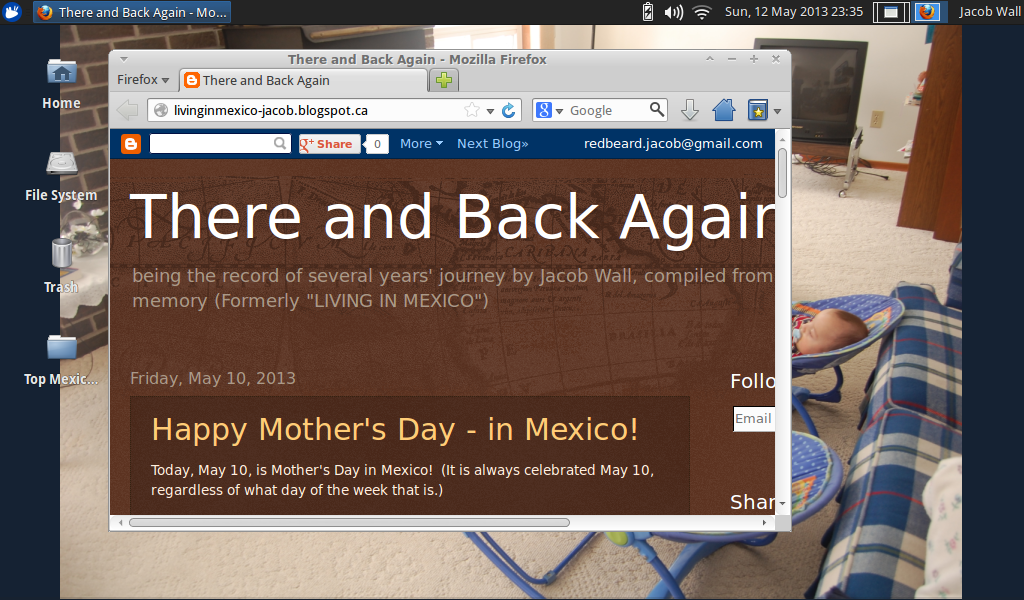
Sunday, May 12, 2013

In Xubuntu, Firefox Works Perfectly (and Thunderbird)

The Firefox-Ubuntu Logos combined
So, here it is: my apology to Mozilla, the developer of Firefox.

My (Unmerited) Quarrel with Firefox
Almost a month ago, I changed to Chrome and posted an embittered complaint against Firefox on this blog.

Then, about 2 weeks ago, encountering the same problems of a bogged down computer, I came to the conclusion that the main the problem was that my mini was not meant for an operating system like Windows 7 (which I suspected from the very beginning).

And Then ... Xubuntu
I proceeded to removed Windows 7 in favour of Xubuntu (a lightweight version of Ubuntu) which has been working flawlessly on my 1 GB mini.

My personalized setup of Firefox in Xubuntu
With Xubuntu came Firefox and Thunderbird, Mozilla's e-mail program which I had used with near-religious dedication previous to my short-lived conversion to Chrome. (After ditching Firefox, I also replaced Thunderbird for the offline apps for Gmail and G-Calendar on Chrome.)

I figured I would give them a second chance; after all, if they worked well, it would only confirm that Windows 7 was indeed the main problem.

Result: They have worked amazingly well! No slowdowns, no delays, no bogging down, no crashes, etc.

Thunderbird with more features, working better!

The Ubuntu-Google Search default start page
Additionally, I set up:
  • Lightning (Thunderbird's calendar) which I had also used before
  • Synchronization with Google Calendar (which I had set up during my abandonment of Mozilla)
  • Synchronization of my Google address book with that of Thunderbird (this process is not flawless, but it is consistent, so I can easily work around the glitches)
  • Synchronization of Gmail, so I can read and send mail from that account in Thunderbird, which automatically synchronizes with Gmail

All the synchronization is instant and 2-way.

Thunderbird E-mail program in Xubuntu
Besides the fact that these services make my life easier by bringing my Google account to my desktop and usable offline, they should make Thunderbird heavier and slower starting up than before.

However, to the contrary, running in Xubuntu, it loads within a few seconds and never slows down, freezes or crashes as it did daily running in Windows 7.  Firefox loads in about 1 second.

Don't Drink (Windows 7) and Drive (a mini)
Again, for the record, I have nothing against Windows 7 per se.  However, it was simply not made to work on a mini laptop with only 1 GB of memory (or "netbook" I believe they're called more officially.)

But there are good, free operating system alternatives out there.  Xubuntu is one of them.  It is easier to change systems than endless try to tweak W7 and try lighter programs to make it work on a system that simply can't handle it.

Lightning Calendar in Thunderbird for Xubuntu
Firefox is Back
So, needless to say, Firefox is back for me, probably to stay, along with Thunderbird.  I flirted with the idea of trying Chrome.  I tried Chromium (the same thing) for about an hour, but saw no real advantage.  Both work well.  Chrome is fine, and I see no problem with it.  If I ever have problems with Firefox in the future, I will not hesitate to go back.

But Firefox, the browser I know and like best, turned out NOT to be the problem and actually works really well in my new operating system.

I am now happily in the Mozilla camp once again.

In other news, yesterday I installed Xubuntu on another mini that I had left abandoned as "fried" for two years. It too works flawlessly.  But that will be another post.

Friday, May 10, 2013

I Canned Windows 7 for Xubuntu ... and I Love It!

One of the official screen shots of Xubuntu

So, as I told the world during my impassioned complaints against my beloved Firefox, I had switched to Chrome.  I thought the problem was solved.  Then, a little more each day, the computer started slowing down again.  Last Thursday it got to the point where I was wasting up to fifteen minutes at a time waiting.  It didn't get to the point of freezing or having to power off manually, but it was still wasting my time and frustrating me.

I could no longer blame any of the individual programs. Basically from the beginning I knew that Windows 7 just wasn't right for this light-weight mini.  But I had been resisting and trying everything else first.

So, last Friday, I said good-bye to Microsoft Windows and switched to Xubuntu, a free, open-source Linux-based operating system.

So far, I couldn't be happier!

After a bit of research on Google for a low memory operating system, I chose Xubuntu for a couple of reasons:

I had already toyed with the idea of switching to Ubuntu a few years back, so I was somewhat familiar with this system
  • Xubuntu is a lighter-weight version of Ubuntu 
Ubuntu works best with more than 1 GB of memory, which means my mini was right on the threshold.  I would rather play it safe.
  • It is visually appealing 
Apparently, other lighter-weight systems, like Lubuntu (the lightest choice in the Ubuntu family) can be rather austere
  • It's easier for Windows users
Apparently, it is easier to get used to for Windows users than many other Linux systems.  It comes with a full package of programs, it's fairly user-friendly and takes minimal computer knowledge to get the hang of it.
My Xubuntu Desktop after some minor customizations
I'll be trying some of the other light-weight systems I saw, like Lubuntu and Puppy Linux, for some abandoned old computers that are kicking around, just to see how they do when a nice but ultra light-weight system is installed.

Why Not Get a Better Computer?

Some people will wonder why I just didn't invest in a new computer.  Basically, if I had several hundred dollars that I could readily fork out for a computer better than this one, I'd have better things to spend them on.  I use my computer for work, but my needs are so simple, I shouldn't need anything more than my Acer One.

Someone mentioned installing more RAM.  Minis don't take any upgrades whatsoever.  Which brings me back to square one.

Finally, I don't mind the idea of avoiding giving more of my money to Microsoft.  I not on a boycott or anything silly like that, but it sure is a nice bonus.

The Installation and Customization

To install Xubuntu, I had to download a torrent file and then unpack into a USB stick to create a boot drive, and from there it's fast and easy.

The only difficult part is that instructions for just about everything have to be Googled, relying in bloggers.  Their site has basics, but if you don't know what a "torrent" is (my situation) they don't help you much.

There was an option to have Xubuntu running parallel with Windows and choosing between the two at start up.  Stupidly, in a moment of over excitement of canning Windows 7 I opted to wipe Windows off my computer along with all its programs and files.

I had saved all my work, pictures and documents, but I had forgotten to save logins and passwords.  This week has been defined by me hunting out this information again, usually from its original provider or (on the rare occasion) from my brain - nothing of Windows is left on my computer.

Spectacular Performance!

The performance of my computer with Xubuntu is amazing!  I used to power on my computer and go to make a coffee while I waited for Windows 7 to boot.  It now turns on in about 10 seconds.  Programs open faster and run faster.  I used to have to wait about 5 minutes for Skype to close properly.  It now closes instantly.

The file manager in Xubuntu
With a few adjustments to visual preferences (including a desktop background, a little luxury which the Starter version of Windows 7 denied me) everything is smooth running.

Programs and Apps

The biggest time consumer since installing Xubuntu has been choosing and adjusting programs.  But I would rather be spending time on this than waiting for a bogged computer while I should be working.

Most importantly: I owe Firefox and Mozilla an apology.  But I will post about the programs in the days to come.

My Verdict

My recommendation at this point: if
  • you have a computer with tonnes of memory that you will probably never use
  • the monsters of Windows 7 and 8 work well with it
  • they meet your needs
  • you're happy with all of the above,
why look for anything new?

On the other hand, if you find your computer is just getting bogged down and keeps freezing up, try Xubuntu or another light-weight free operating system.  If you take it too the store for repairs, they'll just tell you to buy a new version of Windows (which might do the same thing if your computer is a light-weight) or buy a new computer.  They make the cost of repairs so high that it's not worth it.

Xubuntu may make a computer that you thought was no longer working right a smooth-working and functional machine.

(Disclaimer: I'm by no means an expert on any of this stuff.  Coming into this, I knew almost nothing about Linux and systems like Xubuntu. This means two things: 1. There may very well be much better options than Xubuntu. 2. At least it speaks well for Xubuntu that someone who knows as little as I do can install and use it.)

Thursday, April 18, 2013

And Now for Chrome ...

In the Beginning...
For a brief time in my teenaged years I used Netscape. At some point, I changed to Mozilla/Firefox and I never looked back.  I was a solid convert.

Internet Explorer never cut it for me, and it still doesn't.  Like so many things Microsoft comes out with, their user-friendliness makes no sense to me and I fumble over it all the time.

When Chrome was released I tried it briefly.  I could never find what I wanted to do (bookmarks, history, settings, etc.) and I had actually been quite happy with Firefox, so I just uninstalled it.  I had only tried it on the excitement of a new thing from Google, and the recommendation of a friend.  Later again, the same friend reassured me it had improved even more.  But basically, my contentedness with Firefox left me with no desire or need to try anything else.

Disillusionment


But that has changed.  A few months ago, my laptop (an under-performing mini from Acer that really isn't fit for Windows 7) started getting bogged down to the point where I couldn't even shut it down properly.  I found some online fixes, including registry and graphics adjustments.  They helped a lot, but not completely. Although it had stopped freezing up, it still slowed down to the point where I would have to waste half an hour closing everything and shutting down (that's how slow it was) and restarting to make it work properly.

And then came the shocking realization.

Could it be that some service or function of my dear Firefox was causing the problem?  I had realized that the slowdowns only happened when Firefox was running.  In fact that had always been the case, but for months I just assumed that it was the internet activity, and not Firefox itself.  But even after the registry and graphics fixes, the pattern just became that much more clear.

Just today, it struck me; for the second time in a week, Firefox was running like a tricycle on mud road, taking a good 20 minutes to open pages.  In good faith, I assumed that we were having internet problems.  (Even this morning, I still readily and undoubtingly blamed Bell Canada without even considering Firefox.) Then my wife sent me a message over Skype. She was upstairs in the same house on the same internet connection.  No problems. (With crawling twin babies, and two other young children, it's easier than trying to come downstairs in person.)  I opened Internet Explorer to finish something off before restarting.  No problem.  Could it really be?

The Big Move
Quickly coming to the (shocking, life-changing, devastating yet fully liberating) realization that it was becoming increasingly apparent that Firefox was probably the main culprit all along, and still disliking Internet Explorer, I quickly downloaded and installed Chrome, hoping to retrieve some work that had been unsaved when Firefox starting "spinning its tires."  No luck.  Firefox had cost me an hour of work this morning. (Yes, I know, you're supposed to save every few minutes but in this case it was clearly the case of Firefox.)  And how many hours of frustration and searching the internet for improvements to make Windows 7 faster had Firefox already caused me?

I did a few blog posts on Chrome, downloading and uploading pictures, everything moving rapid and easily, while Firefox was still chugging away in the background.  So, I knowing the drastic measure I had to take, I opened the task manager and forced Firefox to close.  I authorized Chrome to transfer the settings from Firefox, and - here it is - for the first time (in nearly a decade?) I uninstalled Firefox with the intention of doing so permanently.

Is This the End?
Earlier in the evening I briefly considered changing the description of this blog to say:

"... an expat writes of his escape to Mexico and then back to Canada, a spiritual journey, a change in web browser and many discoveries in unexpected places in life."
 But the emotional pain is still to deep.

Firefox has let me down.

But so far, with 6 hours of using Chrome, all is well, not a single slow down or even delay or glitch.  In the past few months, this is a record.

(And just so you know that I'm not all that emotional about all of this, here's a good laugh:)

Wednesday, April 17, 2013

Back on Facebook, and Now on Chrome


So, I'm back on Facebook and now using Google Chrome.  To completely unrelated pieces of new, but I'll just lump them together here since they're both about internet usage.

Facebook
In seven and half months that I was gone, I can't say I missed it much.  I never found myself with any urge to browse Facebook or see what other people were posting, liking or commenting on.  Most of this is that I had more than my internet fill with a few blogs and online newspapers.

I opened my account again for a couple practical reasons:

  • It really is easier to keep in touch with, find and get in contact with people who live in other places, and see pictures of friends and family that are not nearby.
  • It's a great way to spread the word about news, work and businesses, and related to that:
  • With my wife starting up work in photography again, I thought it would help.

So, I'll have to see if I get hooked again, or if I can manage to limit my time an use it only as a tool and an occasional distraction.

I've also changed to Chrome, but what I wrote about Chrome and my abandonment of Firefox was so long that I decided to put in a separate post - tomorrow.

Friday, November 11, 2011

Online in Mexico - the Mexican Way!

Well, this isn't the connection I have, but I'm not sure which is sketchier.
After over a month of having internet access only at work and sporadically through a shared cell-phone network portable modem, I'm finally re-connected with a full-time internet connection at home!  The best part about it is that it's thoroughly Mexican way of getting the internet as well.

Back in Canada, if you want the internet, you call your phone company, they come and set it up, and it gets charged on your phone bill.  While this is definitely an option in a growing number of places in Mexico, phone lines have not yet been installed where I'm living - another difference, since I'm sure in Canada, homes wouldn't be sold before the phone lines go into the community.  The two options here are a cell-phone network connection like I mentioned above, or a sketchy wireless service that requires someone to put a big antenna on their roof.  I've now opted for this second option.  (No offense to anyone reading this who provides sketchy wireless connections -  I'm quite happy with mine right now!)

Fortunately I'm not the one with the big antenna on my roof.  One of my neighbors did that and he's splitting the service with a few people in the neighborhood.

So, now I can get back into my bad habits of staying up till 2 in the morning writing blogs and checking Facebook.