Showing posts with label Fun. Show all posts

Tuesday, April 29, 2014

Now for Something Different - Android on my Laptop

HP Slatebook 14 will come with Android
To be perfectly honest, I take little interest in tablets and smart phones and their operating systems.  If one day I own one, that might change.  I had heard of Google's Android phones and tablets, but last week when I randomly came across an old article explaining that Android is available to be installed on laptops, I couldn't help but to be curious.

I did some investigation to find out that laptops are currently being put on the market with Android.  So, I headed over to the site for the Android X-86 project, downloaded the ISO and I was off to the races.

Background - My Experience with Tablet Operating Systems

When my wife bought a new laptop with Windows 8 on a year and a half ago, I realized very quickly that I was not a fan of the new app-based start screen.  To me it looks clumsy, disorganized and in general very visually unappealing.  This surprised me from Microsoft.  (This was also one of the final steps to push me towards Linux, but that's a different story.)

Windows 8 - Bulky and visually unappealing
I also guessed that part of what Microsoft was doing was making an operating system suitable for/based on the smart-phone/tablet OS concept.  To begin with, this gave me a dislike for the idea in general.

Later, however, I tried some netbook-oriented desktop layouts, which basically work on the same visual concepts, without the focus on web-apps.  For example, Kubuntu's netbook remix has a very similar layout concept to that of Android.  In fact, while I'm not a fan of Kubuntu/KDE's visuals in general, I did like the netbook remix because of this; I probably would've gone with that, except that it was noticeably slower on a netbook than Xubuntu/XFCE.

Also, even though I focused on learning the command-line in Linux, Ubuntu's Software Center get me used to the idea of a web-store for apps.  By the time I dove into Google Play on my newly installed Android OS, it no However longer seemed foreign and awkward.

A laptop with Android
Advantages of Android on a Netbook

Although I have not dived very deep into Android and I have not customized the desktop as much as I would like, I have found some real advantages, including these:

  1. It's Very Lightweight and Fast - Android was designed for smartphones and tablets which are not high-powered machines.  Therefore, it works extremely well on the light-weight netbooks like my Acer Aspire One.  Anyone who has installed a Linux distro will notice that the ISO downloads and sets up in Unetbootin really quickly.  Installation is also the fastest I've tried (except for Puppy Linux, perhaps.)
  2. It's Visually Ideal - Smartphones and tablets have small screens, and Android's layout was set up accordingly with large icons and quickly accessible full-screen navigation instead of traditional menus.  It's also a very nice looking desktop.
  3. There are Many Apps Available - Google has ensured that Android is well-provided for in Google Play, not only with ultra-light smartphone apps, but also with a number of fully functional programs like Chrome. (I was actually surprised to see that Chrome was not the default.)
  4. It's Linux - Most Android users don't know that it's Linux.  That having been said, the experience, as I see it, is un-Linux-like; for example, you can't just go into a terminal window and use the commands that seem to work in just about every other Linux distro.
Some Disadvantages/Problems

First of all, I assume that the new laptops that come with Android installed have fixed any problems to make it run ideally on a laptop.  But installing it as I did, I've found the following issues:

  1. Screenshot doesn't work - The ones on this post are borrowed from other sites.
  2. Mouse function is touchscreen-style - Instead of being able to click and drag to highlight text in a web browser, for example, you have to click and hold until it hightlights a section, at which point you can use the cursor or arrows to change what's selected.  Scrolling in any app is dragging the screen rather than clicking on an arrow/scrollbar or using arrows.  This isn't really a "problem" but it takes getting used to.  It would be perfect for a laptop with touchscreen.
  3. Some apps won't run in the background - For example, three Grooveshark music player apps I found (not to mention the website) stops working as soon as you navigate to a different app or even the desktop.  I think you can find apps that especially indicate that they keep running, but this point is a nuisance since some apps (like music apps) are useless if they don't run in the background.
  4. The screen saver flickers on and off.
  5. Dual booting is tricky to set up - If you've dual booted before, the process is quite different.  For someone just trying to rescue an old netbook for easy web access this wouldn't be a problem.  For anyone else, these instructions from Webupd8 work perfectly.
The Android X86 installation screen
There may be solutions to these issues.  As for installing and having a fully functional desktop without having to fix and adjust first (a point in which most Linux distros I've used excel) there needs to be some improvement.  However, it is a very lightweight, fast and visually appealing operating system.  While I probably wouldn't use it for myself, once some of the glitches are worked out, I would consider installing it on a netbook for someone else - especially someone who's already used to using a smartphone.  It's definitely a huge improvement on the monstrosity called Windows 8 which instead of becoming slimmer and sleeker seems to me to be bulky and awkward - both visually and in usage.  Android is sleek and well-designed in both aspects.

In the mean time, I'm definitely going to keep fiddling around with it to see what's possible.

Monday, April 28, 2014

Arch Linux - Having Some Fun

The Arch Linux installation boot screen
Last Wednesday, I shared a few considerations I think people should make before trying Arch Linux.  The most important of these is that if you're going to dive in, I would say you should go in ready to have fun with it; i.e. be prepared to try a lot of different programs, see if you can set stuff up "the hard way," experiment with new desktop environments, try building your own, etc.

And, of course, as I said last time, you will break things.  You will break things to the point that you can't figure out how to fix them and start all over again; rather than stressing out about that, let that be a part of the fun!

These are some of the things I had fun with.

Installation

The fstab file - to tell your computer where to mount each partition
Installing Ubuntu or Mint is easy; it's supposed to be easy and largely hands-off.  That is a good thing.  Had that not been the case, I probably would've given up on Linux when I first tried.

When installing Arch Linux, you have to do everything manually, from installing sudo to setting up your wireless network, to telling it which mirrors to use.  If you do what I did, and make Arch an experiment rather than trying to depend on it as your main operating system to begin with, this is tonnes of fun because you get to learn a lot about how Linux works.  Some things I learned included how audio and internet are set up.

This is also where I learned what fstab is (/etc/fstab/) and how to edit it to tell Linux which partitions to mount when it loads.

The X window system, in which other desktops run
I also learned what the X graphic environment is, and what it looks like when there is no pretty desktop environment installed over it.

Installation could go quickly if you follow the guide and all goes well.  But I found it was the ones that went wrong in some way or another - and ended eating up hours of my time - where I learned the most.

There are several steps to the installation where I just follow the guide, and I don't get them yet - but that will come with time.

As I pointed out last time, this guide on how to install Arch Linux is good to have open beside you on another computer.

Desktop Environments

One thing I've used Arch for is to install and test-drive various desktop environments, such as Gnome, Sugar, KDE, LXDE, Enlightenment, OpenBox, etc.  You can also do this in Ubuntu or any other distro, but since I've reserved Arch as my experimenting distro, I do it here.  That way, I keep Xubuntu clean and tidy for work and every day use.

Also, since Arch is so clean and smooth-running, it gives an excellent way to test these at their best performance.

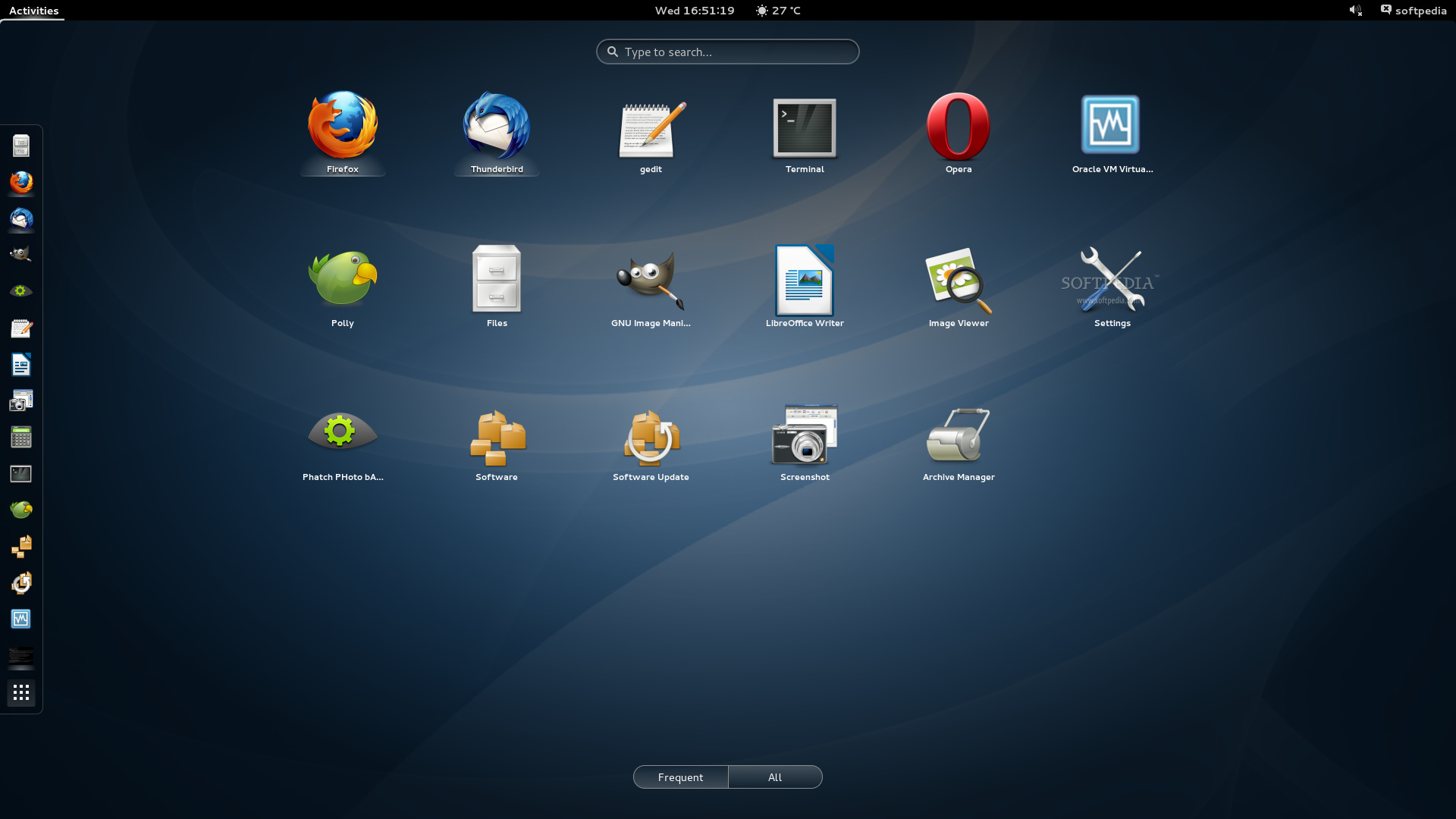
Gnome in Arch Linux
The guide I mention above offers this as the last step.  But, as the writer says, if you stop at that, you've missed the point.  At the very least, testing various desktop environments is a good next step.


Personalized Desktop Environments

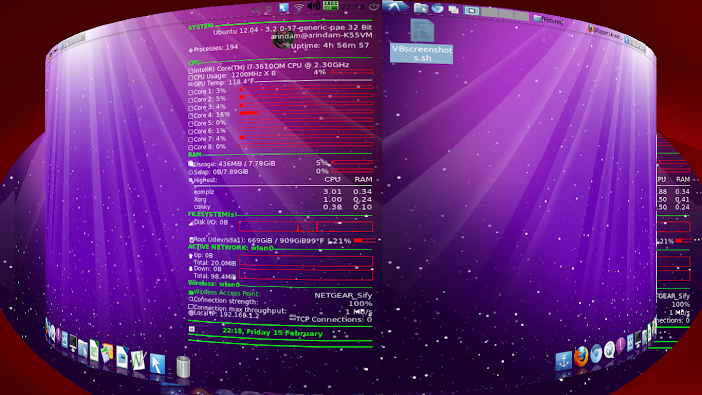
For me, this one is quite fun.  I started off by following this guide on creating a custom DE, adapting it for Arch (it's for Ubuntu.) I discovered that Compiz actually includes a wallpaper manager, so it is not necessary to install another one.  I used Emerald for the window  decoration, which looks really nice, sort of metallic and transparent.

Even though Compiz is not light-weight and is typically associated with rather resource-hungry desktop environments (Ubuntu, for example, in which the Unity desktop is plugin for Compiz,) I found this combination to be fast and very responsive; Compiz includes enough features that you don't have install much else.

For a dock, I installed Cairo-dock, which has a very Mac-like look to it, is very visually appealing and has a lot of useful plugins and applets.

Again, all of this could be done in Ubuntu, but in addition to the points mentioned above, the excellent documentation for Arch make it easier to do things and work out any problems that turn up.

Arch with Compiz and Cairo-dock
AUR and Building from Code

While Arch has fewer applications in its official repositories, it has a huge number of applications in the Arch User Repositories (AUR.)  From the angle I'm taking here (i.e. the challenges of Arch are fun,) this has two advantages.

One is that it makes many more programs available to choose from.

The other is that you learn to build from code.  You download compressed .tar.gz files ("tarball",) decompress them with tar -xvf, compile them (usually make, ./config and makepkg) and finally install with pacman -U.  When you first try this, it is truly a pain and headache.  There are always dependencies, and some have to be downloaded from AUR and compiled; sometimes dependencies have dependencies, and you loose track of where you were.

But in the process, you learn a little more about how installing packages works "behind the scenes," and after you do it a few times, it's not all that hard.

See https://wiki.archlinux.org/index.php/AUR, and note especially the section on installing packages.

Finally, there is a program called "Yaourt" (which you have to download and compile from the AUR) which does all of this automatically.  Once you've installed Yaourt, you can use it just like pacman.  I recommend using Yaourt from the get-go so when all you want to do is install Compiz, you don't spend hours just installing it.  But now and then, I would do it the long & hard way just to get to know the process.  You'll have to do this at least once (plus one dependency) to install Yaourt anyway.

The terminal wifi-menu option
Some Challenges - Icon Themes, Network Indicator

Building a custom desktop has its challenges. For example, there is no icon theme and some little things don't work automatically, like the network indicator in the indicator applet in the panel/dock.  If you install a desktop environment like Gnome first, it will automatically use the icon theme and other settings.  However, if you install only a custom desktop to begin with (from the command line, at the end of the installation process linked above) they won't be there.

I have not yet figured out how to make them work. This is not a problem because they don't effect functionality (networks can be detected and connected to easily from the command line, it just doesn't look as "pretty") and I don't depend on my experimental Arch desktops for daily use.

Finally (and most importantly) they give me more things to figure, and more fun to look forward to in the future.

Conclusion

It would be entirely reasonable to set up a permanent installation of Arch with my favourite DE, XFCE (which is what Xubuntu runs.)  There would probably be advantages like this, such as slightly snappier and lighter running, and rolling updates.  In the future, maybe after experimenting with it for a while, I would consider this.

But the bottom line is that I'm entirely happy with Xubuntu without any complaints.  For now, I'm happy to use Arch as my fun distro for experimenting, building, breaking and learning.

Wednesday, April 23, 2014

Linux Round 2: Do You Dare Try Arch Linux?

In my initial delving into the world of Linux, I settled on Xubuntu as the best distro for my usage (and for my computer,) and then learned how to adapt it for a netbook and customized the program suite.
Since then, I've spend some time on and off experimenting with other Linux distros.  So far, in my still very limited knowledge, I have come to 3 conclusions:

  1. Xubuntu is still the best for me - For my day to day usage, I continue to use Xubuntu pretty much as I set it up a year ago, with only very minor modifications.
  2. I would recommend Linux to pretty much anyone - It comes in so many shapes, sizes and versions, many of which are completely usable "out of the box" (i.e. without any modification) that most people will find a version that will not only meet all of their needs but also be visually appealing.
  3. Linux is lots of fun - For people who simply want a more functional alternative to Windows, find a good distro, and stick with it. For others, there's lots of fun to be had with trying out different desktops, modifying visuals, adapting to your needs, figuring out what's going on behind the visual facade of a monitor, etc.
Arch Linux - The Real Thing!

As for this last point, one of my ongoing side projects after settling on Xubuntu has been fiddling around with Arch Linux.

If you've been around the Linux world for any time, you've probably heard that Arch is one of the best distos out there, with very clean code, no software clutter, no unnecessary processes eating up your computer's resources and completely customizable, so you make it exactly what you want it to be.  Many experts will rate it 10/10 at the top of the Linux distos available.

As far as I can tell, all of this seems to be true.

Compiz Cube
So far, of programs I've tried in different distros, they seem to work faster and be more responsive in Arch.  For example, just last week I tried setting up the Compiz cube workspace selector for the first time. On my little netbook, in Arch it worked flawlessly, spinning around through the workspaces without any noticeable distortion, etc.  In Ubuntu, it felt like it was too much for this light-weight computer and the screens ended looking twisted in the transition process.

Pacman, the program used to install new programs on the computer, is also amazing.

But ...

When I was 4 years old, I saw my two older brothers riding around on their bikes without training wheels.  Before I would get onto my new bike, I insisted that my dad take the training wheels off.  I returned home scraped and bruised and still wobbly on my bike, but with my pride completely in tact, knowing that I could ride a bike the way my older brothers did, without those training wheels that little kids have to use.

With Arch, there are no training wheels ... or helmet
I think my experience with Arch Linux has been a similar one.

Besides all the praise, anyone reading up on Arch will quickly also find the warnings that you have to know what you're doing.  This is true.  I read these warnings too, but in my typical fashion, I decided to jump right in, just to prove (to myself) that I could do it - and I can tell you, I've had my share of scrapes and bruises, not to mention that I am a far cry from being good at this yet.

But, as with my bike, I can now say I did it.

Starting With Arch - A Checklist

First of all, I will repeat the warnings: if you are new to Linux and looking for that ideal distro to suit your needs, don't even try Arch - for now.  My prediction is that it would drive you away from Linux.

I am not the one to give advice here, since I am so new to everything, but I would suggest the following as prerequisites:

  • You know how to dual boot.
  • You know how to configure and fix Grub, the program that boots your operating system, at least using an online guide if necessary.
  • You have another computer available at any time to look up instructions or how to fix what you've broken. (You will break things.)
  • You've customized some a more user-friendly distro (Ubuntu, Mint, etc.)
  • You've (successfully) fiddled around with configuration files (not the visual GUIs that make it easy, but the actual file.)
Dual Booting and Grub

 
I recommend knowing how to do this as the first necessity because it allows to have your stable distro on one partition, and then have another distro "in the works" on another.  This way, if your desktop is still under construction and not yet what you need it to be, or you break it (again, you will break it) your computer is still usable for day to day usage in your main distro.

You don't really have to know how to do this, but more importantly know where to find it.  This is where that second computer is very important.

For dual booting, see this guide for dual booting linux and Windows. (A very similar process can be applied to dual booting Ubuntu and Arch Linux.)

This guide explains how Grub works and how to do basic repairs.  This one tells you how to make Grub give you a menu after installing Windows.  Generally speaking, if you add a second installation, Linux distros will set up Grub to give you a menu, but it's good to know what to do when something goes wrong.

The first time I tried dual booting, the new distro simply loaded right after the boot and I was worried I had lost my main, customized Xubuntu installation with all my files. They were backed up, but at that time, the idea of going through it all again was not very appealing.  As it turned out, I just had to fix Grub.

If you are comfortable dual booting and fixing Grub, then knowing how to modify and customize is less important since it allows you to go back to your main distro at any time or scrap what you've done and start from scratch.


Finally, A Few Tips

Again, I'm far from being an expert, but sometimes tips from someone who is just going through the learning process can be more helpful than those from someone who knows it so well that they think it's easy.  So, if you decide now is the right time to try Arch, do the following:

Use a How to Guide - A Necessity

When people say it's an absolute necessity to have a how-to guide to set up Arch Linux, they really mean it's a necessity, as opposed to a good option to make it easier; without the guide, you'll boot Arch, get a command line and have no idea what to do next.  If you remember some terminal commands from Ubuntu, let's say, it's likely none of them will work since you haven't installed the programs yet.

Arch Linux has its own installation guide but I prefer this one from Whitson Gordon at Lifehacker.  Here, you will need a second computer so you can read the guide as you install.

Have a Wired Internet Connect

Whitson recommends this, but on my first go, I decided to try using a wireless connection anyway.  I spent several hours digging deeper and deeper into the Arch Linux documentation (which is excellent and exhaustive, by the way) until I finally got it working.  With a wired connection the second time, it was working in 2 minutes.  Once you have the installation set up, it's very easy to set up wireless.

The ArchBang installation boot screen
Start Off with Arch Bang

Arch Bang is a variation of Arch that comes fully usable with a visual desktop environment (Openbox) and all the basics you need to begin.  For example, networks, sound and video card are all set up; in Arch you have to do these yourself.  The boot disk also guides you through installation, including setting up Grub.

Once you have it installed you can try installing other desktop environments, etc.

It doesn't give you the full Arch installation experience (= more in depth knowledge of Linux and plenty of headaches) but it does give you a way to get used to installing and customizing Arch ahead of time and ease into the process.  More than once, I've thrown away an unsuccessful attempt at doing what I want in Arch, and doing in Arch Bang first to get a better idea of where I'm going wrong.  I later go back and try it from a new installation of Arch.  You can also get used to using Pacman, Arch's superior package manager (to install new programs) and the online documentation (which is the same for Arch Linux and Arch Bang.)  I suggest this is a good way to start, before trying to install Arch from scratch.

Have Fun and Try Lots of New Things

If all you want to do is install a good distro on your computer, and use it that way for the next 5 years, I would say there's little point to going to Arch.  For me, that's what Xubuntu is.  Yes, it's very stable, clean and fast, but I wouldn't say it's worth going through the rather longish learning process for that. It is worth it, though, for lots of experimentation and fun.

Tomorrow I'll share some of the things I've tried in Arch.

Thursday, July 25, 2013

Saloon Brawls Should be Safe, Legal and Rare

In the complete absence of saloon brawls or the like, men have been faced to turn to video games; this has caused the dangerous illusion that they are really capable of winning a brawl, or recovering from one quickly.

Even worse, many men don't even have video games and are left searching for alternative expressions of masculinity, like smoking pipes or shaving old-fashioned razor blades; needless to say, both are life-threateningly dangerous.

To help remedy this urgent situation of masculine health, I propose the following:

Saloon brawls should be safe, legal and rare.

Safe - Paramedics should be on hand to remove men who can no longer get up on their own and give them adequate medical treatment.  Missing teeth or broken arms should not qualify for this service, since those suffering from these injuries can still walk home and take care of themselves.

A saloon brawl video game
Legal - Current laws have made impossible for men to initiate or even seek out local brawls;  such activity would surely bring jail time and legal action.  Our laws must be changed to reflect this basic necessity and right for masculine well-being; a man should not have to fear being jailed or a criminal record simply for breaking a wooden chair over another man's head.

Rare - It would be unreasonable to think that the local tavern could carry the costs of a brawl every Friday evening.  Besides the inconvenience of closing for several days for repairs, it would drive up the prices of beer.  Brawls should allowed to happen often enough that any man choosing to participate could easily do so in his lifetime without having travel far or wait till he is too old to do so; yet they should be rare enough so the local taverns can recover and absorb expenses easily.  Men initiating tavern brawls too frequently in the same place would be expected to cover the expenses.  Those who are fond of brawls are free to find a different tavern or bar each week.

Some would argue that this last point is limiting to a man's right to brawl as he sees fit; men should be free to choose about their own body.  However, the point of this proposal is not to create a free-for-all, but simply to give each man the choice to participate in a tavern brawl should they feel that need, rather than having to turn to sad situations of video games, smoking or shaving with dangerously sharp objects.

Thursday, April 18, 2013

And Now for Chrome ...

In the Beginning...
For a brief time in my teenaged years I used Netscape. At some point, I changed to Mozilla/Firefox and I never looked back.  I was a solid convert.

Internet Explorer never cut it for me, and it still doesn't.  Like so many things Microsoft comes out with, their user-friendliness makes no sense to me and I fumble over it all the time.

When Chrome was released I tried it briefly.  I could never find what I wanted to do (bookmarks, history, settings, etc.) and I had actually been quite happy with Firefox, so I just uninstalled it.  I had only tried it on the excitement of a new thing from Google, and the recommendation of a friend.  Later again, the same friend reassured me it had improved even more.  But basically, my contentedness with Firefox left me with no desire or need to try anything else.

Disillusionment


But that has changed.  A few months ago, my laptop (an under-performing mini from Acer that really isn't fit for Windows 7) started getting bogged down to the point where I couldn't even shut it down properly.  I found some online fixes, including registry and graphics adjustments.  They helped a lot, but not completely. Although it had stopped freezing up, it still slowed down to the point where I would have to waste half an hour closing everything and shutting down (that's how slow it was) and restarting to make it work properly.

And then came the shocking realization.

Could it be that some service or function of my dear Firefox was causing the problem?  I had realized that the slowdowns only happened when Firefox was running.  In fact that had always been the case, but for months I just assumed that it was the internet activity, and not Firefox itself.  But even after the registry and graphics fixes, the pattern just became that much more clear.

Just today, it struck me; for the second time in a week, Firefox was running like a tricycle on mud road, taking a good 20 minutes to open pages.  In good faith, I assumed that we were having internet problems.  (Even this morning, I still readily and undoubtingly blamed Bell Canada without even considering Firefox.) Then my wife sent me a message over Skype. She was upstairs in the same house on the same internet connection.  No problems. (With crawling twin babies, and two other young children, it's easier than trying to come downstairs in person.)  I opened Internet Explorer to finish something off before restarting.  No problem.  Could it really be?

The Big Move
Quickly coming to the (shocking, life-changing, devastating yet fully liberating) realization that it was becoming increasingly apparent that Firefox was probably the main culprit all along, and still disliking Internet Explorer, I quickly downloaded and installed Chrome, hoping to retrieve some work that had been unsaved when Firefox starting "spinning its tires."  No luck.  Firefox had cost me an hour of work this morning. (Yes, I know, you're supposed to save every few minutes but in this case it was clearly the case of Firefox.)  And how many hours of frustration and searching the internet for improvements to make Windows 7 faster had Firefox already caused me?

I did a few blog posts on Chrome, downloading and uploading pictures, everything moving rapid and easily, while Firefox was still chugging away in the background.  So, I knowing the drastic measure I had to take, I opened the task manager and forced Firefox to close.  I authorized Chrome to transfer the settings from Firefox, and - here it is - for the first time (in nearly a decade?) I uninstalled Firefox with the intention of doing so permanently.

Is This the End?
Earlier in the evening I briefly considered changing the description of this blog to say:

"... an expat writes of his escape to Mexico and then back to Canada, a spiritual journey, a change in web browser and many discoveries in unexpected places in life."
 But the emotional pain is still to deep.

Firefox has let me down.

But so far, with 6 hours of using Chrome, all is well, not a single slow down or even delay or glitch.  In the past few months, this is a record.

(And just so you know that I'm not all that emotional about all of this, here's a good laugh:)

Thursday, October 4, 2012

How to be an Evil Overlord, and NOT be Overthrown

This is old, but it's fun! From Peter's Evil Overlord List:

The Creator's Copyright Notice:
This Evil Overlord List is Copyright 1996-1997 by Peter Anspach. If you enjoy it, feel free to pass it along or post it anywhere, provided that (1) it is not altered in any way, and (2) this copyright notice is attached.

The Top 100 Things I'd Do
If I Ever Became An Evil Overlord

  1. My Legions of Terror will have helmets with clear plexiglass visors, not face-concealing ones.
  2. My ventilation ducts will be too small to crawl through.
  3. My noble half-brother whose throne I usurped will be killed, not kept anonymously imprisoned in a forgotten cell of my dungeon.
  4. Shooting is not too good for my enemies.
  5. The artifact which is the source of my power will not be kept on the Mountain of Despair beyond the River of Fire guarded by the Dragons of Eternity. It will be in my safe-deposit box. The same applies to the object which is my one weakness.
  6. I will not gloat over my enemies' predicament before killing them.
  7. When I've captured my adversary and he says, "Look, before you kill me, will you at least tell me what this is all about?" I'll say, "No." and shoot him. No, on second thought I'll shoot him then say "No."
  8. After I kidnap the beautiful princess, we will be married immediately in a quiet civil ceremony, not a lavish spectacle in three weeks' time during which the final phase of my plan will be carried out.
  9. I will not include a self-destruct mechanism unless absolutely necessary. If it is necessary, it will not be a large red button labelled "Danger: Do Not Push". The big red button marked "Do Not Push" will instead trigger a spray of bullets on anyone stupid enough to disregard it. Similarly, the ON/OFF switch will not clearly be labelled as such.
  10. I will not interrogate my enemies in the inner sanctum -- a small hotel well outside my borders will work just as well.
  11. I will be secure in my superiority. Therefore, I will feel no need to prove it by leaving clues in the form of riddles or leaving my weaker enemies alive to show they pose no threat.
  12. One of my advisors will be an average five-year-old child. Any flaws in my plan that he is able to spot will be corrected before implementation.
  13. All slain enemies will be cremated, or at least have several rounds of ammunition emptied into them, not left for dead at the bottom of the cliff. The announcement of their deaths, as well as any accompanying celebration, will be deferred until after the aforementioned disposal.
  14. The hero is not entitled to a last kiss, a last cigarette, or any other form of last request.
  15. I will never employ any device with a digital countdown. If I find that such a device is absolutely unavoidable, I will set it to activate when the counter reaches 117 and the hero is just putting his plan into operation.
  16. I will never utter the sentence "But before I kill you, there's just one thing I want to know."
  17. When I employ people as advisors, I will occasionally listen to their advice.
  18. I will not have a son. Although his laughably under-planned attempt to usurp power would easily fail, it would provide a fatal distraction at a crucial point in time.
  19. I will not have a daughter. She would be as beautiful as she was evil, but one look at the hero's rugged countenance and she'd betray her own father.
  20. Despite its proven stress-relieving effect, I will not indulge in maniacal laughter. When so occupied, it's too easy to miss unexpected developments that a more attentive individual could adjust to accordingly.
... 

Read the other  80 items on his page (Peter's Evil Overlord List)  (I don't "get" them all, but enough of them for it to be funny!)

Thanks to Fr. Z's blog for the link.

Saturday, January 28, 2012

Crate training for ... kids?!?


 Planning for are upcoming return to Canada, we are getting our dog ready to come with us this time.  (Last time he stayed with our former landlady, a dear friend of ours who loves the dog and treats him very well.)  Part of our preparations were to buy a crate (yesterday.)  If you know anything about dogs who've never been in a crate, you'll know that they don't like it, and it's a process to get them confident and comfortable to enter their crate.  (See below.)


But we had an unexpected result of putting the crate out in our living room; our two kids transformed into puppies and decided that the crate was a great place to play.  They spend the entire morning today fighting about who got to be in the crate.  We had to make them take turns sitting in the crate, pretending to be happy puppies in their new house.

The one-year-old loves to take the dogs food and spread it all over the floor, so when we put the dog's food into the crate to help him get used to it and start enforcing the idea that the crate is associated with good things, the baby got extra excited and got in before the dog did. It was almost impossible to get the baby out of the crate at that point.  When we did, he was angry.

  If only the dog were this excited about the crate ...


Yes, the dog gets to use his crate, too.

Saturday, January 7, 2012

A Tragic Wedding

Wedding crown, veil and crossA few weeks ago, I wrote about the sad love story of “Alfredo” and Lola, a tragedy that I watch play out every day of my life.  This weekend, on Saturday, January 7, 2012, this story took yet another tragic turn.

Lola’s aunt, being single herself, was worried that the family wouldn’t be seeing any grandchildren anytime soon, decided to obligate Lola to marry Ramon, her family’s preferred son-in-law, in an official wedding, assuming that this would somehow help in bring about the desired grandnephew or -niece.

“Alfredo” was invited to the wedding, and, against his will, his parents forced him to go and sit quietly in repressed suffering while he watched the love of his life first make vows she could never truly believe in her heart, and then sign a contract, vowing and promising to remain loyal to the chosen husband of her arranged marriage, implicitly renouncing and disowning the true love of her life (“Alfredo"), forever.

Poor “Alfredo.”  But such is life, and I only hope that he can overcome this tragic event in his life.  Just now I saw him in his house, downcast, almost expressionless, as though reality was no longer real.

For anyone who didn’t read the first part ("Forbidden Love"), “Alfredo” is my dog Simba.

Dog wedding, bride and groom
Lola and Ramon are the neighbours’ two Chihuahuas.  The aunt is the owner’s 8-year-old sister, who really does believe that having a wedding would make the two dogs have puppies.  Eager for the puppies, she really did have a wedding on Saturday, which included a wedding dress and a veil for the “bride,” a bowtie for the “groom,” and the traditional Mexican elements of the “crown” (like a wreath made of flowers) placed on the bride’s head after the vows, and the rope that is placed around the newly married couple to symbolize the new-found unity.

There were also vows (said on the dogs’ behalf) and a marriage certificate (signed by inking and stamping the dogs’ paws.)  There was a reception where mole with chicken (a traditional Mexican dish, prepared by the girl’s mother) was served.

Dog in loveShe also sent out hand-written invitations earlier in the week, one specifically to Simba, who really is in love with Lola. The rest is as told above.  (I’m not sure if I should say this publicly, but I saw the way Simba was looking at Lola during the ceremony, and I suspect that he thinks he still Dog wedding, Chihuahua in a wedding dresshas a chance …)

Friday, November 11, 2011

Online in Mexico - the Mexican Way!

Well, this isn't the connection I have, but I'm not sure which is sketchier.
After over a month of having internet access only at work and sporadically through a shared cell-phone network portable modem, I'm finally re-connected with a full-time internet connection at home!  The best part about it is that it's thoroughly Mexican way of getting the internet as well.

Back in Canada, if you want the internet, you call your phone company, they come and set it up, and it gets charged on your phone bill.  While this is definitely an option in a growing number of places in Mexico, phone lines have not yet been installed where I'm living - another difference, since I'm sure in Canada, homes wouldn't be sold before the phone lines go into the community.  The two options here are a cell-phone network connection like I mentioned above, or a sketchy wireless service that requires someone to put a big antenna on their roof.  I've now opted for this second option.  (No offense to anyone reading this who provides sketchy wireless connections -  I'm quite happy with mine right now!)

Fortunately I'm not the one with the big antenna on my roof.  One of my neighbors did that and he's splitting the service with a few people in the neighborhood.

So, now I can get back into my bad habits of staying up till 2 in the morning writing blogs and checking Facebook.

Friday, September 9, 2011

Made in Canada from Imported Ingredients

Peanut

A while back, my wife and I bought a bag of peanuts in their shells.  Nothing terribly exciting interesting.  However, out of habit, I like to read the list of ingredients even on the Peanuts - Bagsimplest products.  The bag reads:

Ingredient

Peanuts.

May contain tree nuts.

So far, so good. Then, out of sheer boredom, and something to do as I peeled and munched on peanuts, I read the other side of the bag.  This is how the first two lines read:

MADE IN CANADA FROM

IMPORTED INGREDIENTS


Peanuts - IngredientsI understand one part of this: the one ingredient (peanuts) is imported.

What I don’t understand is exactly which part of it was “made in Canada.”  Perhaps if it said “packaged in Canada” I could understand what they mean.  But “made in Canada??”


I didn’t think we as Canadians cared enough about whether a product was domestic or Peanuts - Made in Canadanot to make this kind of absurdity necessary.  Then again, I could be wrong.


I guess I could call that toll-free number to find out exactly how a peanut can be made in Canada from imported ingredients.

Tuesday, June 21, 2011

Learning to Ride a Bike – A Father’s Day Gift

Me, my neice, and my son on his bikeThis Father’s Day was very special for me since I had the joy of helping my son to ride a bike for the first time.  A while back, I put up a post about the day my son first rode a tricycle, which was in Mexico (My son learns to pedal a trike!).  Now, this next step of learning to ride a two-wheeled bike My son, happy to be learning to ride a bike, with his helmet onwas here in Canada.

My goal for the day was to have him try to ride the bike without training wheels at least once (with help of course.)  This was too ambitious, and my son simply didn’t want to.  But by the end of the day he was confidently riding the bike with training wheels, moving ahead at a good speed and using the back-pedal brakes.  I’m proud of him.

Friday, January 28, 2011

This is how I got myself a Mexican wife

The One Semester Spanish Love Song
My wife always tells me I should write a book called, "How to move to Mexico and get yourself a Mexican girl."

This video says it all: 

One Semester of Spanish - Love Song


If that doesn't work, try this: 

2nd Semester of Spanish, Spanish Love Song

Enjoy!

For another take on my story, read: WARNING: Mexico is DANGEROUS! Do not come here - unless ...

Saturday, December 11, 2010

Mexican Birthday Parties and Introverts

As far as I can can tell, a typical Mexican birthday party for children includes 4 standard items:

The Song and Cake for a Triple Birthday
  • The Piñata - most people know how a piñata works.  Piñatas in the shapes of favorite movie/TV characters are popular.
  • The Birthday Song & Candles - "Las Mañanitas" is more elaborate than "Happy Birthday" in both tune and words, with poetic complements like "the day you were born was the same day all flowers were born." Like "Happy Birthday" it is sung with the candles lit on the cake.
  • The Birthday Cake.  After blowing out the candles, the child (or adult) takes a bite of the cake.  Usually someone shoves their face into the cake while they are taking the bite - a stark contrast to the lovely complements of the song. (Contrasts like this are typical of Mexican culture).
  • A bag of Candies for the kids adds to what they already collected in the piñata.

Of course, other games and activities are often added.

Ever since moving to Playa del Carmen the already very festive season from November to February has been made even more festive with many birthday parties (one of which is my own on the same day as my wife's saint day.)  Today I was at one birthday party in which by the time the piñata was broken, the boy who was turning 6 was upset and sitting on his aunts knee, sulking.  I don't know about what.  During the song, he just sat there staring blankly into the candles.  He refused to blow them out, which his 3-year-old sister did for him in the end.  His dad took it upon himself to shove his face into cake.  He never did take a bite, and after his mother wiped the icing off, he went upstairs crying, and the party went on, everyone very happy and festive.

Although the parents told me this boy was just upset because of some meaningless temper tantrum, it made imagine how I would have been as a boy.  I was very introvert, and I hated being the centre of attention during the song and candles.  Getting my face shoved in the cake would have probably been enough to make me go up stairs to sulk alone for the rest of the evening.  For two of the four birthdays I've had in Mexico I did get my face shoved in the cake, but now, as an adult, it's fun for me. (Of course, playing the game of pretending to avoid it is part of the show, and makes it that much more fun for everyone when that unexpected quiet person beside you is the one to give you the shove; last time it was my mother-in-law.)  But as a kid things would have been different.

Even as an introvert adult sometimes Mexico can be overbearing; shortly after getting married, I visited my wife's uncle's home.  All the uncles and aunts wanted to see us dance together, which I'm not good at, and I don't like doing, especially if people are specifically watching me.  The more I protested, the more aunts and uncles joined in the urging.  Finally I gave in.

"You're right.  He really can't dance," said one aunt.
"No, no, definitely not," said another. "When are you going to teach him?"

I sat down, red with embarrassment.  The aunts went back to their conversations, and the uncles went back to offering every type of liquor they had available; "offering" means pouring a glass of liquor and putting in front of you, then asking if you wouldn't prefer to have another in addition (replacement or refusal weren't options.)  No body, except me, seemed to give the bad dance performance any further thought.

Today my parents, who are visiting, saw the preparations for the party across the road and the large number of guests and thought it must be a special age.  As far as I can tell, 6 years isn't one of the special parties. In general, however, I think birthdays here get much more attention.  By our standards, they might be overdone; but by any standards Mexican parties are a lot of fun.

On the whole, I believe being an introvert kid in Mexico would be harder than being an introvert kid in a country like Canada.  I'll be writing more on this in days to come.

Friday, November 5, 2010

Have you ever flushed your phone down the toilet?

This post is for the person who I love the most in the world!  For everyone else reading it, I have a few questions:

  • Have you ever flushed your cell phone down the toilet?
  • Have your glasses fall off down into the lower level of subway station, while you were admiring the artwork below?
  • How about turning the image on your computer screen upside down while trying to lower the volume?
  • Have you broken an AC adapter/charger just by touching it?
  • Maybe you've discovered the circuit board on your camera was burnt out by invading ants (which were also fried in the process)?

If you are like most people, I assume you would answer "no" to all or at least most of these questions.  My wife, Cecilia, would answer "yes" to all of them and many, many similar incidents.

Last night, I heard a scream coming from upstairs, followed by "Jacob, you're not going to believe this."  Not knowing exactly what I wasn't going to believe, and thinking we would be making a trip to the hospital (she's 38 weeks pregnant right now), I went running up the stairs to find her looking down into the toilet, and saying "My cell phone!  I flushed it down!  Ahhh!!"

My worry disappeared in a moment, and I began laughing uncontrollably.  She started laughing too, mixed with crying.  I hugged her, but couldn't keep from laughing.  Our 2 year-old son looked on with confusion, not knowing whether to be worried or to laugh with us.  When I stopped laughing, he took me by the hand, and re-explained the situation to me (since he had been informed first) pointing into the toilet to make it clear to me where the cell phone had gone; in his eyes, I hadn't understood the seriousness of the incident.  He then took me downstairs to find my cell phone and ensure that it was safely away from the toilet.  Meanwhile, my wife continued laughing/crying upstairs.

Because of this kind of event, we buy those $30 dollar cell phones that come with $20 of free pre-paid credit. (To be fair, I also lost one - it fell out of a new belt-clip case that I had bought the same day, on the bus.)

Four years ago this toilet incident would have surprised and concerned me.  In fact, about a week after I met her, when she lost her glasses in a Mexico City subway station, I was very surprised and concerned.  Knowing what I know now, it all makes sense.  She has some sort of bad luck with technology, electronic items and glasses.

This is a part of my wife's personality, a part of who she is; and I love this part of her!  Going through life together, she is the greatest motivation, support and inspiration for me, and it's a great joy to be with her every day, so I can definitely live with cell phones being flushed down the toilet, cameras being eaten by ants, and all the rest of it.

I love you, Cecy!

(Tonight, as I finished this post, my son came to ask me for my cell phone to lend it to my wife; again, he took the time to explain to me why she needed to borrow mine ...)

Tuesday, October 26, 2010

How often would you use this?

The Banana Containter - With a Fork!
First of all, this has nothing to do with living in Mexico. It’s just something fun to write about! One little form of pointless entertainment I have is to look through those catalogues that people circulate from family to family, or are tucked into the pocket in the seats in airplanes (the place where I first discovered this game) to find, what seems to me, the most absurd item for sale.

Yesterday a neighbor gave my wife this catalogue (they seemed to be passed around among women, I have no theory to explain why; there are as many men who buy nicknacks like these as women.) After my wife excitedly drew my attention to an object that I found perfectly useless, I started with my little game of finding the most fun and pointless object, and I found this banana container. There was one other object which came close in pointlessness (a pair of padded tweezers used to clean glasses – those special cloths from the optometrist do just fine, there’s no need for a special invention) but lacked the “fun” aspect of the banana container. If you use tweezers like that, and you actually find them to work better, let me known; I’ll take back my words.

Let me explain the theory; a normal and very useful part of the development of civilization is that specialized tools are created to make jobs easier. Hence, using kitchens as an example, we have waffle irons, coffee makers and potato peelers, in addition to the frying pans, stove top pots and knives, each of which could be used satisfactorily in the case that we didn’t have the other gadgets. But all so far are useful, if you consume waffles, coffee and potatoes frequently enough.

Likewise, instead of just bags and generic containers, someone managed to invent a half-sphere, round bottomed container in which a cut tomato or onion could be stored in, air tight, with a minimal amount of air around it, preventing the cut edge from turning brown or slimy, as they tend to do if left open in the fridge. They also keep the smell of onions from filling the fridge. So far, we are still within the realm of usefulness, for anyone who keeps tomatoes and onions in their fridge every week.

However, somewhere in the world, there seems to be extra money floating around that the rest of us don’t know about; someone is getting paid to take these ideas and extend them to such a specific use that they can’t possibly used for anything else, like this banana container.  They get put into these catalogues.

By the time you get to something this specific, you can no longer justify it by how often you eat bananas. I eat at least two bananas every day, as do my wife and son (along with bread, it’s probably the single food item we eat the most of,) and I would not be able to justify buying this thing on any rational grounds. We also send bananas to school with our son, but instead of fretting about squashing the banana, or wishing we had a banana shaped container, we take 30 seconds to cut them up and put them in a small, round air-tight Tupperware container (which one of my aunts very kindly gave as a gift to my son – thank you if you read this!) We also add granola and yogurt. The banana doesn’t go funny or get brown.

Besides this, did you notice the little fork that clips into top of the lid?  Who eats a banana with a fork? Please tell me if you do, and I will buy you one of these containers.

Now, just to let you know, I would possibly buy this container, just because it crosses the line so far, that it’s fun. So, if you ever invite me to your birthday or wedding, and I don’t know what to get you, you might end up with one of these banana containers. (Only if my wife doesn’t know you; she wouldn’t let me do this to anyone she knows.) If you would like one of these, let me know, and let my wife know so she knows it’s a serious gift.

I estimate that 55% of the objects in these catalogues have only one use, and cannot possibly used for anything else. I assume this is how the catelogue gets most of its sales – no matter how many of their nicknacks you buy, you always need another one. Of those 55%, about half of them are funny, like the banana.

Of the other 45% which have more than one use, I can see the point of about half of them, and there are about 2 things I would actually buy when they fit into my budget. The only problem is I can’t remember what they were.

This is all just my opinion; I know a bunch of people who would love many of the nicknacks in this kind of catalogue – even the ones I consider pointless. That’s not such a bad thing; it makes it easier to buy birthday presents for those people.